



Livecam Installation
Requirements for a Livecam installation
- a beautiful location - ideally with 360° view
- a Livecam mast with 80mm interior diameter
- a power connection 220-240V (US: 110-120V) with a maximum distance between camera and mains of 15m (generation 4 + 5 + 6) or 30m (generation 3 + One)
- an internet connection, either by DSL (cabled) or GSM (4G)
- optionally a surge protection (power + ethernet) for cameras that are exposed to lightning or a butler box with surge protection for very remote camera installations
Please consult our installation manuals for a complete and step-by-step installation documentation including camera + mast dimensions as well as network set-up:
Roundshot Livecam generation 3 installation manual [pdf, 2.5 MB]
Roundshot Livecam generation 4 installation manual [pdf, 2.9 MB]
Roundshot Livecam generation 5 installation manual [pdf, 3.2 MB]
Roundshot Livecam generation 5 solar installation manual [pdf, 3.0 MB]
Roundshot Livecam generation One + One S installation manual [pdf, 3.0 MB]
Mains adaptor Livecam generation 2 + 3 [pdf, 139 KB]
Mains adaptor Livecam generation 4 + 5 + 6 [pdf, 229 KB]
Roundshot Livecam CMS Tutorial [pdf, 6.1 MB]
Beautiful location

Show your environment in all its beauty - make people dream! The choice of location is a first and very important step for the future success of a Livecam.
During an on-site scouting visit, the Roundshot team will assist you to find the perfect spot - both from a technical as well as a photographic point of view.
Livecam masts
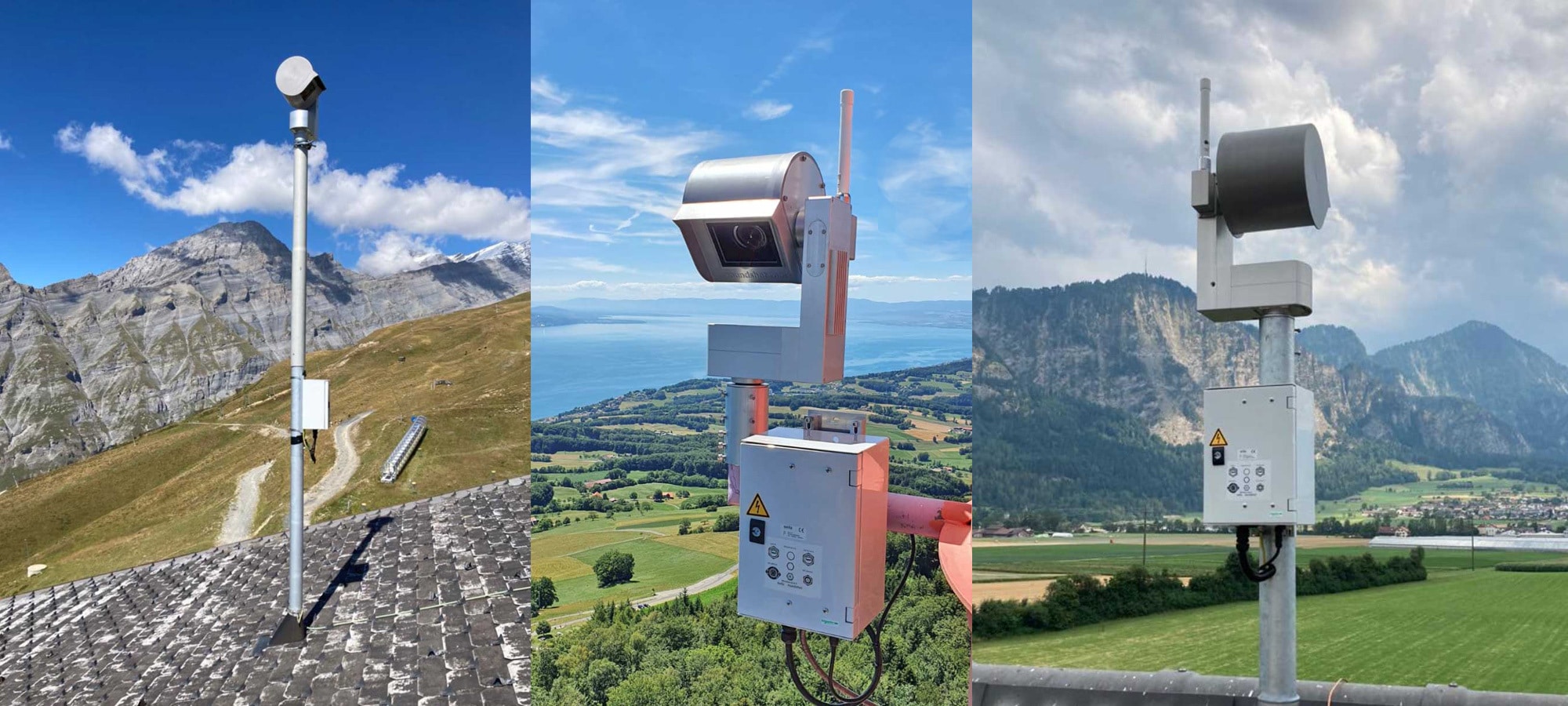
As every Livecam location is different, a variety of different mast types are available - please consult the installation guide for details.
The 360° Livecams (generation 3, 4, 5 + 6) slide into a solid steel or aluminium tube of 80mm inside diameter which serves at the same time as housing for the ethernet and power cables. Alternatively, the camera can also be attached with clamps and tube to a pre-existing structure.
Attaching the Livecam One is even more simple. It can be fixed to a rail or tube using two clamps and adjusted vertically and horizontally to frame the image.
Some mast examples:
mast with ground socket [pdf, 23 KB]
mast with ground socket 130cm [pdf, 106 KB]
mast for solar system [pdf, 114 KB]
On demand, we can also send a mast drawing suitable for a specific Livecam project.
Power supply

There are two types of main adaptors available:
Roundshot Livecam gen 2 + 3 + Livecam One:
Livecam gen 2 + 3 + One mains [pdf, 139 KB]
- maximum distance between camera + mains adaptor (24V cable): 30m
Roundshot Livecam gen 4 + 5 + 6
Livecam gen 4 + 5 + 6 mains [pdf, 229 KB]
- Livecam gen 4, 5 + 6: maximum distance between camera + mains adaptor (24V cable): 15m
Our Livecam generation 4 camera is equipped with 6 internal heatings, while the generation 3 model uses up to 3 heating systems. This is why a stronger power supply and a shorter feeding cable is required for generation 4 models.
Internet connection

Generally two types of internet connections are possible:
- wired DSL - connection with RJ45 cable to a router/switch
- GSM (4G) - with GSM router inside the camera or with an external GSM router connected by RJ45 cable
To prepare the camera for a wired DSL operation, the Roundshot team needs to know the network configuration (automatic IP by DHCP or fixed IP, subnet, gateway + DNS). When running the Livecam inside a network, the network administrator enables ports 80, 443 + 123 (in/out, no blocking of binary packets) on the firewall.
Our cameras require the following minimum monthly data plans:
- Livecam gen 3: 10 GB monthly
- Livecam gen 4 + 5 + 6 (panoramas only): 50 GB monthly
- Livecam gen 4 + 5 + 6 (panoramas + videos): unlimited data
minimum internet speed: 10 Mbps
Power surge protector + butler box

The Roundshot power surge protection is installed directly at the camera and protects the 24V power supply and the RJ45 Ethernet connection. A green LED indicates the current status of the lightning protection - a solid green LED means that the lightning protection is intact.

For cameras in hard-to-reach locations, we recommend installing our Roundshot butler box. In addition to a built-in lightning protection, an IoT device is added that monitors all parameters of the camera - for example the power supply, the quality of the mobile data connection, the status of the lightning protection etc. - and sends this data to our cloud. The camera can also be restarted via a separate 4G mobile connection via reset.
Content blocked
The content to be displayed here comes from the "Youtube Videos" service. The company uses so-called cookies. For data protection reasons, approval of the cookie settings of the "Youtube Videos" service from the heading "Content from external content providers" is required.